EasyPrompter Release Notes
New prompting, display, editing, integration, and team-workflow improvements
The August 2026 Reliability Update
August 24, 2026
Improvements & Fixes
- ●Spotted a translation that looks off? You can now flag it from inside the app so we can correct it faster.
- ●App updates now apply reliably instead of occasionally stalling before reloading.
- ●More reliable offline editing when creating scripts, creating collections, and saving changes.
- ●Fixed the undo and redo buttons showing as greyed out in the editor.
- ●Remote displays now appear in Operate Mode previews faster after connecting.
The August 2026 Companion Update
August 20, 2026
EasyPrompter for Bitfocus Companion
EasyPrompter is now officially included in Bitfocus Companion, so you can find it in the Connections screen and add dedicated teleprompter controls to your production setup.
The August 2026 Update
August 20, 2026
German and French
The EasyPrompter interface is now available in German and French.
Improvements & Fixes
- ●Improved wording and consistency across all supported languages.
- ●Made general stability and reliability improvements throughout EasyPrompter.
The August 2026 Update
August 12, 2026
Faster, Safer Script Libraries
Large script libraries now open quickly, remain fully searchable, and handle bulk actions more reliably, including offline and Trash workflows.
Improvements & Fixes
- ●Large imports from existing EasyPrompter accounts are now faster and more reliable.
The August 2026 Update
August 10, 2026
Move Between Workspaces
Studio users can move individual scripts, selected scripts, or entire collections between personal and team workspaces while choosing their visibility and destination collection.
Choose Where Imports Go
Studio users importing from a previous EasyPrompter account can choose the destination workspace and visibility, and see where previously imported scripts are stored.
Improvements & Fixes
- ●Restored team workspace access for affected beta Studio users.
The August 2026 Update
August 9, 2026
Improvements & Fixes
- ●EasyPrompter can now be installed on compatible displays for quicker setup, easier launching, and a smoother experience if the internet connection drops.
- ●Fixed the reverse speed controls for the Contour ShuttlePRO. Ctrl+Shift+1 through 7 now work as expected.
- ●Images attached to support tickets now appear in the conversation and open in a larger view. PDFs and other files open in a new tab, and filenames in any language work correctly.
The Clearer Language Update
August 3, 2026
Improvements & Fixes
- ●Product language is now clearer across the app, website, and help content, with professional terms explained for newcomers while staying familiar to experienced crews.
The Upgrade and Sharing Improvements Update
July 29, 2026
Improvements & Fixes
- ●Upgrade prompts now show pricing, relevant benefits, and plan comparisons without taking you away from the feature you were using.
- ●Studio sharing now makes it easier to share scripts and collections with teammates, role groups, and invited guests.
- ●Personal and Studio billing are now clearly separated, with visible scheduled changes, trial status, and immediate success feedback.
- ●Eligible Free and Creator accounts can now find the 72-hour Event Pass throughout pricing and upgrade options.
- ●Operate Mode, Word import, displays, remotes, Integration Keys, sharing, and other limits now consistently match your active plan.
- ●Canceled, pending, duplicated, or interrupted payments now recover more safely without losing your existing access or the action you started.
- ●Billing and workspace changes now refresh more reliably across open tabs and stay attached to the correct workspace.
- ●Improved sharing conflicts, invitation feedback, ownership transfers, and access management when a Studio plan ends.
- ●Improved connected-display, offline-navigation, entitlement, and prompting-session reliability.
The Workspace Polish Update
July 27, 2026
Improvements & Fixes
- ●Switching between workspaces now updates your plan and banners instantly, with no brief flicker of the wrong information.
- ●The cookie consent notice now waits until the app is fully loaded before appearing.
- ●A clear message now appears when you try to create a remote control key beyond your plan's limit.
- ●Copy buttons in remote control settings now show an error message if copying to your clipboard fails.
The New Plans Update
July 26, 2026
A Plan for Every Production
After the beta, EasyPrompter will offer Free, Creator, Operator, Studio, and Enterprise tiers, so you can choose the right level for solo prompting, live production, team collaboration, or organization-wide deployment.
Improvements & Fixes
- ●After the beta, try Creator for 3 days, Operator for 7 days, or Studio for 14 days with no credit card and no automatic conversion.
- ●After the beta, use a 72-hour Event Pass for Operator-level personal access when you need professional production tools without a subscription.
- ●Studio plans belong to the team workspace, keeping shared features, roles, managed displays, seats, and billing separate from personal plans.
- ●Prices shown throughout EasyPrompter stay aligned with checkout pricing, including signup, upgrades, and plan changes.
The Always-Ready Displays Update
July 21, 2026
Managed Studio Displays
Register a shared studio screen once and assign it to an operator, so it automatically shows that operator’s teleprompter whenever a session starts, without opening a new viewer link for every production.
Local Display Windows Stay Ready
Display windows opened from the operator’s computer now remain ready between sessions, show Standby while idle, and automatically join the next local teleprompter session without being reopened.
Improvements & Fixes
- ●When opening Full Edit, choose whether connected displays stop or keep playing, and optionally remember that choice on the current device.
- ●Blackout now applies to every connected display, including local display windows and remote network displays.
- ●The Help Center now provides clearer guidance and updated screenshots that match the current app.
The Display Profiles and Session Recovery Update
July 19, 2026
Speaker Profiles for Every Display
Speaker Profiles now remember and restore individual settings for local, network, and OBS displays across prompting sessions.
Sessions That Survive Disconnects
Presentations retain the same session, displays, remotes, and saved position through sleep or network loss, with an explicit End Session for Everyone action.
Improvements & Fixes
- ●Disconnected displays now clear promptly, keeping display counts and connection status accurate.
- ●EasyPrompter now recovers automatically from brief service interruptions, so you can continue without restarting the app.
- ●Improved the reliability of What's New when loading older updates.
The Live Editing Improvements Update
July 18, 2026
Improvements & Fixes
- ●Improved Live Edit responsiveness, reliability, and consistency across connected displays.
The Multi-Item Drag & Drop Update
July 18, 2026
Multi-Item Drag & Drop
Select multiple scripts and drag them together between workspaces, collections, and Trash.
The Live Editing Update
July 17, 2026
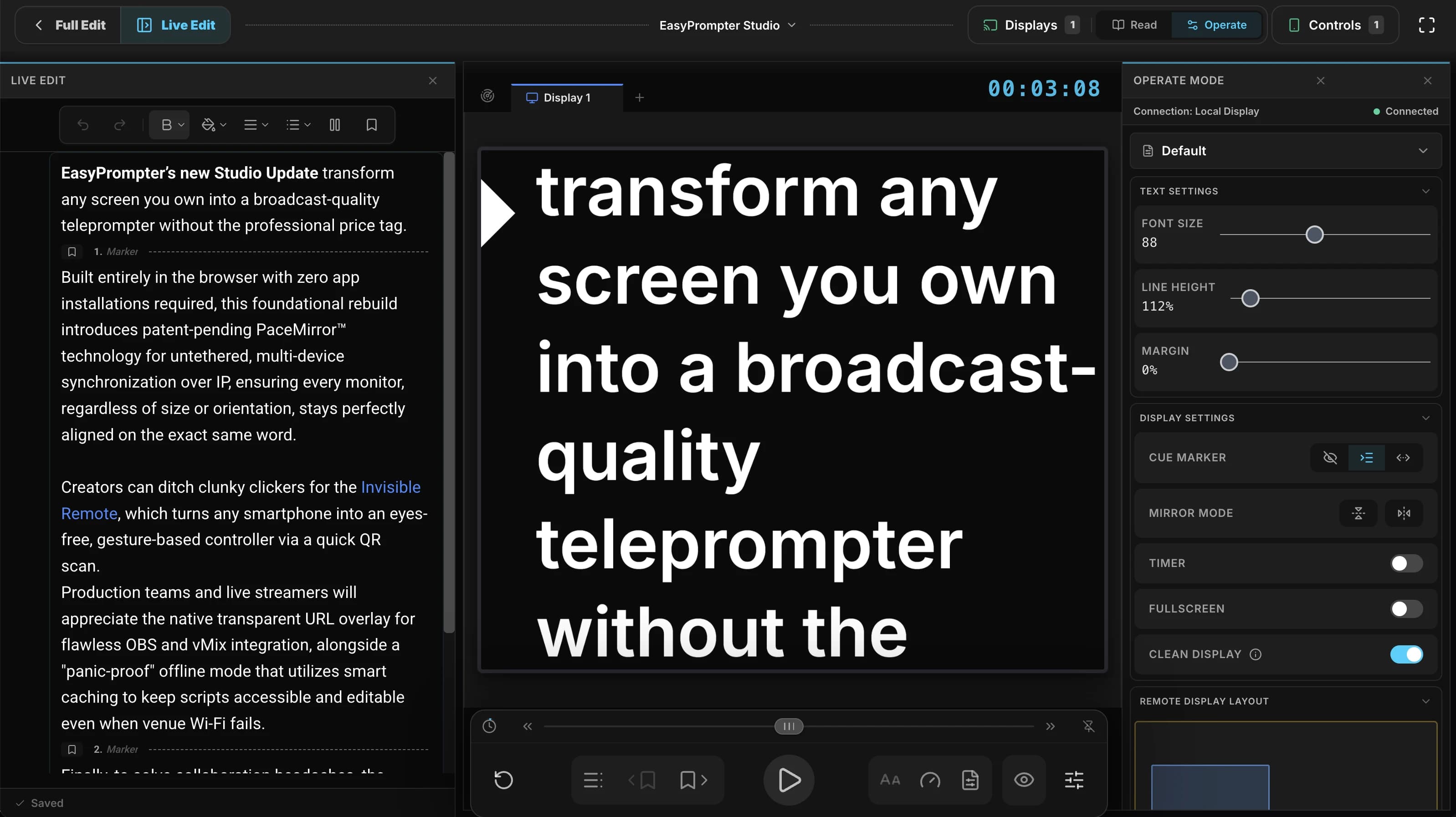
Live Editing While Prompting
On Creator plans and above, edit scripts without interrupting the active teleprompter session. Edits are pushed live to remote viewers while preserving scroll position and animation.
The Plugin Update
July 10, 2026
Improvements & Fixes
- ●Updated Stream Deck plugin to v0.3.2 and Bitfocus Companion module to v1.1.1 with connectivity improvements.
- ●Speaker profiles now load instantly from cache, even when you're offline.
The Speaker Profiles Update
July 4, 2026
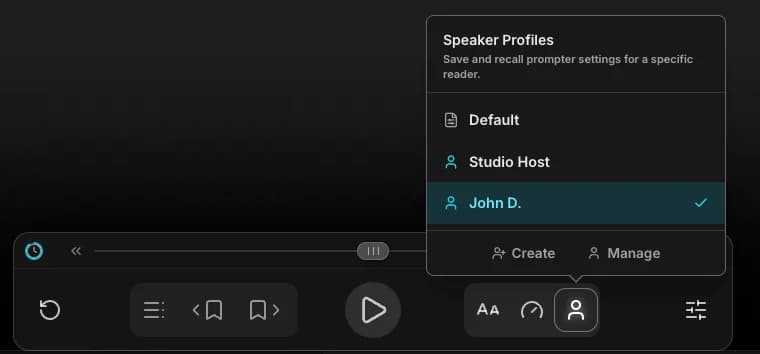
Speaker Profiles
Create and save multiple formatting configurations (like "Guest Presenter" or "Studio Host") and switch between them instantly from the bottom control bar.
Redesigned Script Defaults
A new side-by-side card layout in the settings panel makes it easier than ever to save your favorite formatting as a default or apply it to the current script.
Improvements & Fixes
- ●Cleaned up the settings panel with a simpler, more focused layout.
- ●Stream Deck Plugin v0.3.1 included, with a direct link to the Elgato Marketplace.
- ●Hover tooltips added to the Rewind and Fast-Forward buttons in the shuttle row.
The Hardware Controls Update
July 2, 2026
Stream Deck & Companion Updates
Stream Deck dials now follow your display selection in Operate Mode, adjusting each screen's font, line height, and margin individually. The dial bar color matches the selected display so you always know which screen you're controlling. The shuttle dial has been redesigned with speed-sensitive scrolling, all setup screens now show live connection status, and dial response is noticeably faster. The Bitfocus Companion module also gets faster connections and a new Active Display variable for use in triggers.
Improvements & Fixes
- ●Per-display settings are automatically restored if the server restarts mid-session.
- ●Fixed an issue where adjusting one display's settings could briefly affect other displays.
The July 2026 Update
July 1, 2026
Teleprompter Blackout
Instantly black out all connected displays during breaks or setup — press the Eye button or tap B on your keyboard. Your own view stays dimmed so you can still read. Anyone at a blacked-out display can double-tap the screen to dismiss it locally.
Retrieve Integration Keys
Lost an Integration Key? No need to delete and recreate — you can now reveal it anytime from Settings → Integrations.
Improvements & Fixes
- ●Collection dialogs now show a privacy badge indicating whether you're creating a Team or Personal collection.
The June 30 Update
June 30, 2026
Unified Script Import
Import scripts from the editor or scripts list in any supported format — .ezp, Word (.docx), or plain text (.txt). A confirmation dialog lets you replace the current script or save as a new one, with instant save to your library.
The June 26 Update
June 26, 2026
New Controls Panel
The Controls button in the prompter toolbar now opens a quick-access panel with three sections: scan a QR code to control from your phone, view and customize your keyboard shortcuts and pedal mappings, and jump straight to your hardware integration settings for Stream Deck and Companion.
Improvements & Fixes
- ●Tap any QR code to enlarge it for easier scanning.
- ●Renamed settings tabs for clarity: 'Device' is now 'Display', 'System' is now 'Defaults', 'Remote Control' is now 'Integrations', and 'API Keys' is now 'Integration Keys'.
- ●The Settings back button now takes you where you came from — back to the prompter, scripts list, or wherever you navigated from.
- ●Fixed a connection spinner that could get stuck when a network request failed.
- ●Improved accessibility across the prompter and settings pages.
The Hardware Controls Update
June 25, 2026
Stream Deck+ Touch Strip Controls
Six new encoder dials for Stream Deck+ bring hands-on control of speed, font size, line height, margin, shuttle, and scroll — with live touch strip displays showing real-time values.
Bitfocus Companion Support
Control your teleprompter from Companion with 21 actions, 11 live variables, and ready-to-use presets. Works with StreamDeck, X-Keys, MIDI surfaces, and more.
The Stream Deck Update
June 23, 2026
Hardware Remote Control
Connect an Elgato Stream Deck or other hardware controller to your teleprompter via integration keys. Devices auto-connect when you open the prompter — no pairing step needed.
Improvements & Fixes
- ●Fixed an issue where fast-forward or rewind from a remote control could leave the scroll speed at the wrong value.
The Shuttle Bar Update
June 10, 2026
Smoother Shuttle Control
The shuttle bar now feels more natural — drag it to speed up, slow down, or scroll in reverse. Let go and the prompter instantly returns to whatever it was doing before.
Improvements & Fixes
- ●Fixed a bug where the on-screen controls could disappear while actively dragging the shuttle bar.
- ●Fixed a bug where the last line of a script could scroll off-screen past the reading position.
The Shortcut Reliability Update
June 9, 2026
Improvements & Fixes
- ●Keyboard shortcuts like play/pause and fast-forward now work reliably while the settings panel, onboarding tips, or connection manager are open.
- ●Applying formatting (bold, italic, center) in the script editor no longer jumps the view to the bottom of your script.
- ●Underlined text now matches the text color consistently across the editor, teleprompter, and preview cards.
- ●Right-to-left scripts — including Hebrew, Arabic, and other RTL languages — now display correctly in all views.
The Label Cleanup Update
June 4, 2026
Improvements & Fixes
- ●Cleaner display and remote control labels — buttons now show consistent text regardless of connection state, panel headers are more descriptive, and the connected devices list is always visible (dimming gracefully when empty).
The Stability & Polish Update
June 4, 2026
Improvements & Fixes
- ●Smoother connection panel with animated transitions and a clear waiting indicator when no displays are connected.
- ●Local displays now keep their color, name, and settings across page reloads instead of resetting each time.
- ●Toggling appearance settings like All Caps and Break on Sentence now pushes immediately to connected displays and the Operate Mode preview.
- ●Newly connected displays jump to the operator's current scroll position instead of starting from the top of the script.
- ●Mirror, flip, and cue marker controls in the viewer settings panel now use compact icon buttons with tooltips.
- ●Active sessions now stay alive as long as you're using the app — no more unexpected logouts during long shows.
The Pre-roll Update
June 3, 2026
Adjustable Pre-roll Spacing
Control how much blank space appears above your script before scrolling begins. Choose Off, Compact, or Standard to match your preparation style.
Improvements & Fixes
- ●Added helpful descriptions to the High Contrast, Break on Sentence, and Pre-roll settings. Tap or hover the info icon to learn what each setting does.
The Selection Update
June 3, 2026
Select & Delete Collections
Select multiple collections and delete them in one go — click, shift-click, or use Cmd+A to select all.
Drag-to-Select
Click and drag on any empty space to draw a selection rectangle around scripts or collections. Everything inside gets selected instantly.
The Collections Update
June 2, 2026
Assign Collections
Manage which collections a script belongs to from a single dialog — add or remove multiple collections at once, including in bulk.
Improvements & Fixes
- ●The 'Remove from Collection' button now shows the collection name for clearer context.
- ●Removing scripts from a collection is now a single click — no confirmation dialog needed.
The June 2026 Update
June 1, 2026
Display Connection Status
Viewer tabs now show pulsing status icons to instantly see if a screen is connected, unstable, or disconnected.
Streamlined Operator Panel
View connection details in a clean, compact inline row directly below the Operate Mode header.
Improvements & Fixes
- ●Added a temporary 'Verifying...' status to screens during page reloads until they confirm they are active.
- ●Automatically cleans up inactive screen tabs after 60 seconds if a browser closes unexpectedly.
- ●Fixed a bug where sending rapid setting changes could trigger false connection warnings.
- ●Fixed a bug where a screen could briefly appear twice in the operator dashboard while reconnecting.
The Operate Mode Update
May 31, 2026
Operate Mode
See exactly what each connected display shows in real time. Switch to Operate Mode to preview any viewer screen, adjust its settings, and manage fullscreen — all without leaving the operator view.
The Accessibility & Onboarding Update
May 26, 2026
Improvements & Fixes
- ●Improved accessibility for keyboard and screen-reader users, including better navigation, motion preferences, and consistent button labeling.
- ●Redesigned onboarding experience with contextual discovery hotspots and refreshed tooltip styling to help new users find key features faster.
The Controls Update
May 25, 2026
Margin Slider Moved to Typography Menu
The display margin control now lives in the typography popover for quick access while prompting — no need to open the full settings panel.
Gesture Remote Shuttle Feedback
The mobile remote now shows a live visual indicator when you swipe to shuttle, so you always know how far you're scrolling.
Device Tab Now Opens First
The settings panel now opens to the Device tab by default, putting mirror mode, cue markers, and display options right where you need them.
The Refinements Update
May 25, 2026
Jump to Any Marker by Number
Type a marker number on your keyboard while the marker list is open to jump there instantly.
Theme Toggle in Prompter
Switch between light and dark mode right from the prompter settings panel.
Smarter Edit Conflict Resolution
When two people edit the same script, you can now compare both versions side by side before choosing which to keep.
Improvements & Fixes
- ●Fixed an issue where switching between the editor and prompter could incorrectly trigger an edit conflict warning.
- ●Refined the prompter control panel with improved glass layering and light-mode styling.
The Advanced Controls Update
May 25, 2026
Shuttle Bar Controller
A new shuttle bar UI for precise scrolling and fine-grained control over your teleprompter position.
Gesture Remote Controls
Control the teleprompter entirely hands-free using hand gestures.
Redesigned Settings HUD
A completely redesigned teleprompter settings interface for better usability during live sessions.
Improvements & Fixes
- ●Improved database connection reliability and automated error recovery.
The Speed Range Update
May 21, 2026
Improvements & Fixes
- ●Doubled the maximum teleprompter speed from 80 to 160 LPM for faster-paced reads
The Late-May 2026 Update
May 20, 2026
Viewer Settings Memory
Local display windows now remember their size, position, display name, and all visual settings across sessions — so your multi-display setup is ready to go every time.
Smarter Share Limits
Shared scripts now inherit the creator's plan limits. Paid users can share scripts of any length, while free-plan shares are capped at 500 words.
Per-Viewer Settings Retention
Operator-customized per-display settings (font size, margin, flip, etc.) now survive viewer reconnects and server restarts instead of resetting to defaults.
Improvements & Fixes
- ●Added spacing between instant play buttons and the editor text box so clicks near the left edge no longer accidentally trigger playback
The Welcome Experience Update
May 16, 2026
Floating Display Controls
When the navigation bar auto-hides during playback, a floating pill slides into view so you can manage connected displays and remotes without stopping.
Welcome Script
New users now start with a localized sample script that walks through EasyPrompter's key features — markers, formatting, and playback — so you can jump straight into prompting.
The Social & Feedback Update
May 16, 2026
Social Sharing Previews
Links shared on Twitter, Facebook, LinkedIn, and other platforms now display a branded EasyPrompter card with the page title and description.
In-App Feedback
Submit bug reports or feature suggestions directly from the app using the new feedback button on the scripts and collections pages.
The Word Import Update
May 13, 2026
Word Document Import
Import Microsoft Word (.docx) files directly into EasyPrompter. Formatting, lists, and structure are automatically converted — just drag and drop or use the import menu.
Improvements & Fixes
- ●Teleprompter playback no longer jumps when rotating your device — position and speed are preserved through orientation changes
- ●Trash and restore actions now update the UI instantly with optimistic state management
- ●Fixed markers becoming invisible after insertion when the editor loses focus
- ●Added a 5 MB file size limit to all import paths to prevent browser crashes on oversized files
The May 2026 Update
May 4, 2026
Contextual Play
Hover any line in the script editor to reveal a play button in the gutter. Click it to launch the teleprompter from that exact position — no more scrolling from the top.
Script Ownership
Team scripts now show who owns them. Move and delete actions are reserved for the owner, with a clear explanation when actions are restricted.
Trash
Deleted scripts now go to a recoverable trash instead of being permanently removed. Restore them anytime within 30 days.
Improvements & Fixes
- ●Scripts can now be dragged directly into sidebar collection folders
- ●Bulk actions (delete, move, remove) now run in parallel for faster batch operations
- ●Improved gutter play button hover detection and positioning accuracy
- ●Completed localization of all remaining hardcoded strings across EN, ES, KO, and PT
- ●Added rate limiting to high-risk API routes for improved security
- ●Non-owners can no longer trigger move or delete on team scripts
- ●Improved screen reader support for the script owner info menu
The Jump to Marker Update
April 27, 2026
Jump to Marker
Instantly jump to any marker in your script from the new Jump to Marker panel. Press M or tap the bookmark icon to open it.
The Reconnection Resilience Update
April 27, 2026
Seamless Reconnection
Playback no longer resets when the network drops — the teleprompter preserves your exact position and speed through disconnects.
The Offline Resilience Update
April 25, 2026
Full Offline Support
Create, delete, and organize scripts without an internet connection. All changes queue locally and sync when you reconnect.
Smart Conflict Resolution
If someone edits the same script while you're offline, a conflict banner lets you choose which version to keep.
Prompter Session Recovery
The teleprompter coasts through brief disconnects and automatically resumes sessions after browser restarts.
Improvements & Fixes
- ●Fixed a bug where sliding your finger off-screen on mobile could lock the remote control speed
- ●Improved connection stability for multi-device teleprompter sessions
- ●Fixed playback state resetting during network reconnections
- ●Reduced unnecessary re-renders for smoother UI performance
- ●Hardened server connection pool for better reliability under load
The Late-April 2026 Update
April 21, 2026
Personal Favorites
Starred scripts are now personal — your favorites stay yours, even in shared team workspaces.
Improvements & Fixes
- ●Improved offline reliability — scripts sync more consistently and cached content is preserved during background refreshes
- ●Fixed an issue where sharing a script with edit access would not set the correct permission
The Mid-April 2026 Update
April 14, 2026
Speed Control Precision
Choose between fine (±1 LPM), medium (±3 LPM), or coarse (±6 LPM) speed steps for keyboard, scroll wheel, and slider controls.
Clean Display Mode
Hide the settings HUD on viewer displays for a distraction-free teleprompter during broadcasts.
Offline Second Screen
The local second-screen viewer now works reliably offline — no prior connection needed for synchronization.
The April 2026 Update
April 10, 2026
Multi-Script Selection
Select multiple scripts and perform batch actions — delete, move between workspaces, or add to collections in one go.
Script Import & Export
Import scripts from .txt and .ezp files, or export your scripts to share them across devices.
Collections & Organization
Organize your scripts into collections. Drag and drop scripts between personal and team workspaces.
Improvements & Fixes
- ●Improved editor performance for large scripts
- ●Smoother drag-and-drop between collections
The March 2026 Update
March 28, 2026
Offline Mode
Access your scripts without an internet connection. Scripts are automatically cached for offline use.
Remote Control
Control your teleprompter from a separate device. Perfect for hands-free operation during broadcasts.